

I only really seem to blog about things that really catch my eye. Recently I’ve gotten to a point with my development environment where I can really do some interesting things. This is one of those times where I am starting feel like I’ve got something interesting to share. One note right out of the gate, I use these tools for my own personal “tinkering”. Like many of you, when doing any sort of development for work, I have clear standards to which I adhere.
All of that said, this first part of the series will focus on the infrastructure and access. In part 2, I’ll cover some of the tools I use and how I’m putting AI to work for myself.
The Infrastructure
First off, my core operating environment is clearly based on OCI. Over the years, I’ve written plenty of functions and leveraged a variety of OCI cloud native services, so of course my choice is OCI. The fact that I can do a lot of work in a free OCI tenancy is huge. What’s more, after I put in my credit card, a whole bunch of additional services opened up (like access to a DRG) and I’m still only spending about $10 per month because I want to try new things. At this point, the bulk of my spend is really mostly block storage and some logging.
What’s more, thanks to the work I do with Oracle and opportunity I have to be an Oracle ACE Professional, I’m provided with a tenancy topped off with $5,000 in credits every year to try even more fun ideas. If you’re an avid Oracle professional, you should look into the ACE program.
As far as servers go, I pretty much solely depend on Oracle Autonomous Linux servers. I like these because I don’t have to worry about security patching and vulnerabilities. Thanks to Autonomous Linux, my servers are staying patched and secure. It’s one less thing to worry about. The only bummer is that Autonomous Linux is not available for ARM instances, but there is documentation to implement ksplice yourself. What’s really nice is that if you use another variant of Oracle Linux or Ubuntu on OCI, the ksplice servers are available at no charge!
Of course, we’re talking about cloud development and here I’m gushing over servers. The simple fact is that I predominantly use the servers for access and hosting tools. You can see in image below, that I have a very basic network setup. Frankly, I had a much more complicated network at one point and all it did was serve to give me headaches. For the purposes of what I’m doing, simple is better. When we’re talking about enterprise architectures, the game changes dramatically.
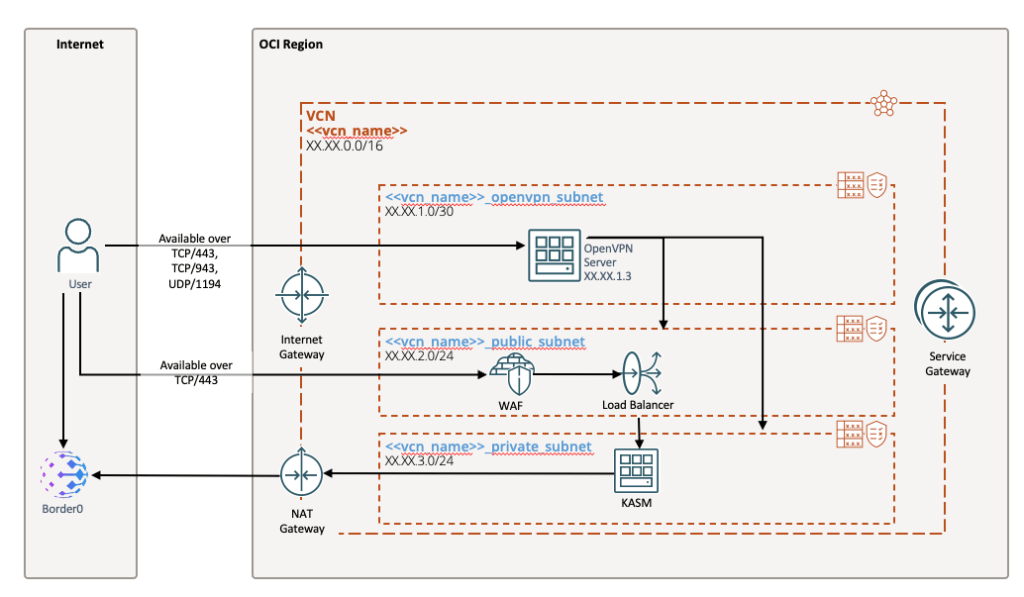
You’ll notice that I have two public subnets, but these are locked down to very specific ports and very small IP space. The OpenVPN subnet only holds an OpenVPN server (I’ll get into that more later). The Public subnet is exclusively designed to host a flexible load balancer. Frankly, having the OpenVPN server exposed to the internet gives me the yips, and that’s why I’ve found a couple of solutions that help me move away from old school IPSec VPN.
Environment Access
With my travels, getting access to my environment has to be secure but simplified. That’s where I found some great tools that make this a breeze and limit my exposure.
OCI Native Options
First, I take advantage of Oracle’s native network security features, only allowing very few items to be publicly facing. In fact, I limit it to only Load Balancers protected by a WAF. Again, thanks to the Free Tier, this costs me nothing because I keep my load balancer under 10mbps (which is plenty).
But wait, I just told you about my OpenVPN server that scares me. In fact, I’ve shutdown that server and only turn it on when absolutely necessary. Consider it “Break Glass”. The truth is that the next options are cleaner, in my opinion, when it comes to providing access in a simplified way.
The second piece of architecture I rely on for access is OCI’s embedded development tools. There is an absolute ton you can do by using Cloud Shell and SQL Worksheets right from the OCI console. That bodes really well when I’ve got a MySQL Heatwave instance and an Oracle Autonomous Database running in the backend (of course, all of which are free with OCI’s free tier).
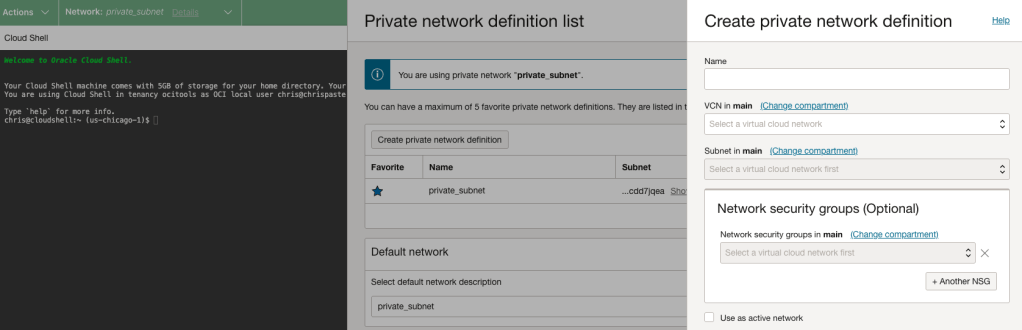
With Cloud Shell, all I have to do is setup a private network definition into my private subnet and assign it the network security group that allows it the access I want to have into any servers or access to services. Because I have the service gateway setup, I can do things like push docker images to the container repo for use with OKE or container instances. By the way, container instances are great for development and testing of containers because you can deploy an ARM architecture and it’s free just like an ARM compute instance (as long as you’re within your free tier limits).
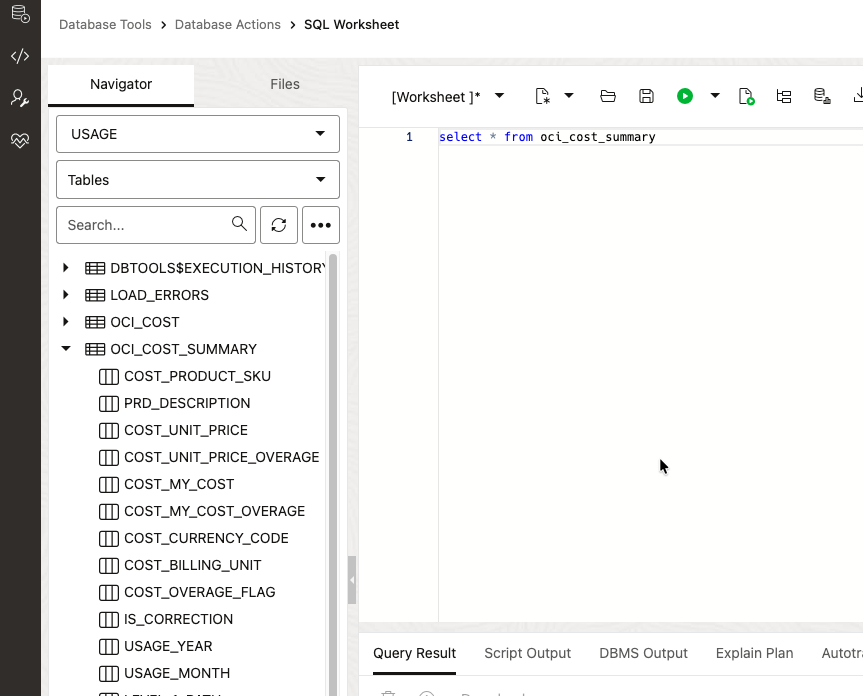
On top of that, SQL Worksheets offers a really simple way to access my Autonomous DB and MySQL Heatwave instances. If you’re using an Oracle database, you get direct visibility to the schemas and objects in each schema. What’s more, the beauty of this is that there is very little setup and zero maintenance. I configure the connection and then I’m off to the races. Oracle handles all of the underlying infrastructure, security, and maintenance.
Border0.com
The next tool I swear by is called Border0. This allows me to install an agent on a server that is in a private subnet with only outbound internet access. That agent then opens a connection to Border0’s protected servers and I can have immediately SSH access through my browser. I can ultimately use this as a jump server to get elsewhere in my network, or I can leverage it to access my development server.
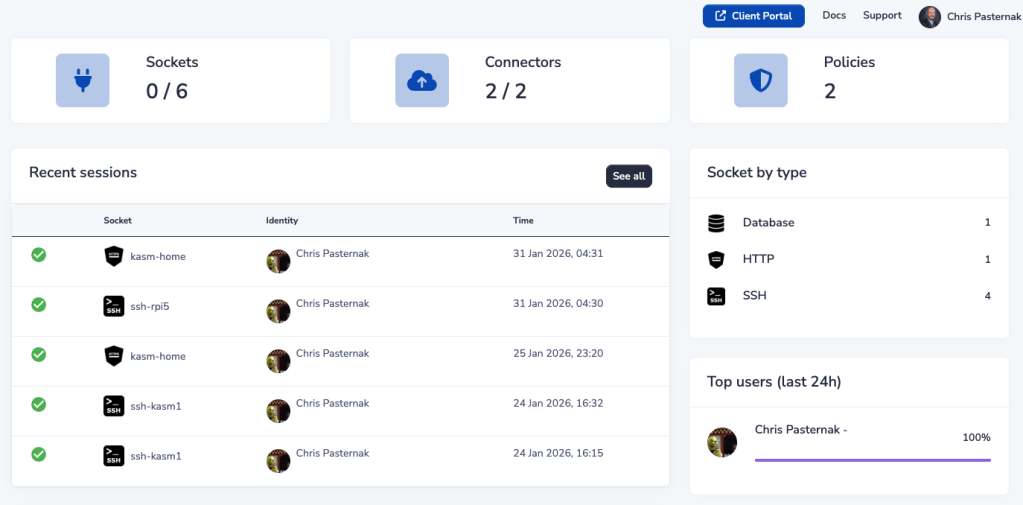
The way it works is that you create a new connector in the dashboard, it gives you a command to run that installs and configures a agent on your server. This agent then opens a connection to Border0 and allows you to ride the connection back to your server. There’s no inbound security rules that need to be open as long as your server can communicate out to the Border0 servers.
One you have a connector defined it automatically sets up a “socket” for SSH, which is a type of connection method. The really nice thing is i can configure a variety of sockets that use this connection as a jump. So if I have a web app I want to access on my private network, I can setup an HTTP socket and Border0 will proxy that for me. Where I use this the most is at home. I refuse to open any inbound access to my home network and this allows me to avoid it.
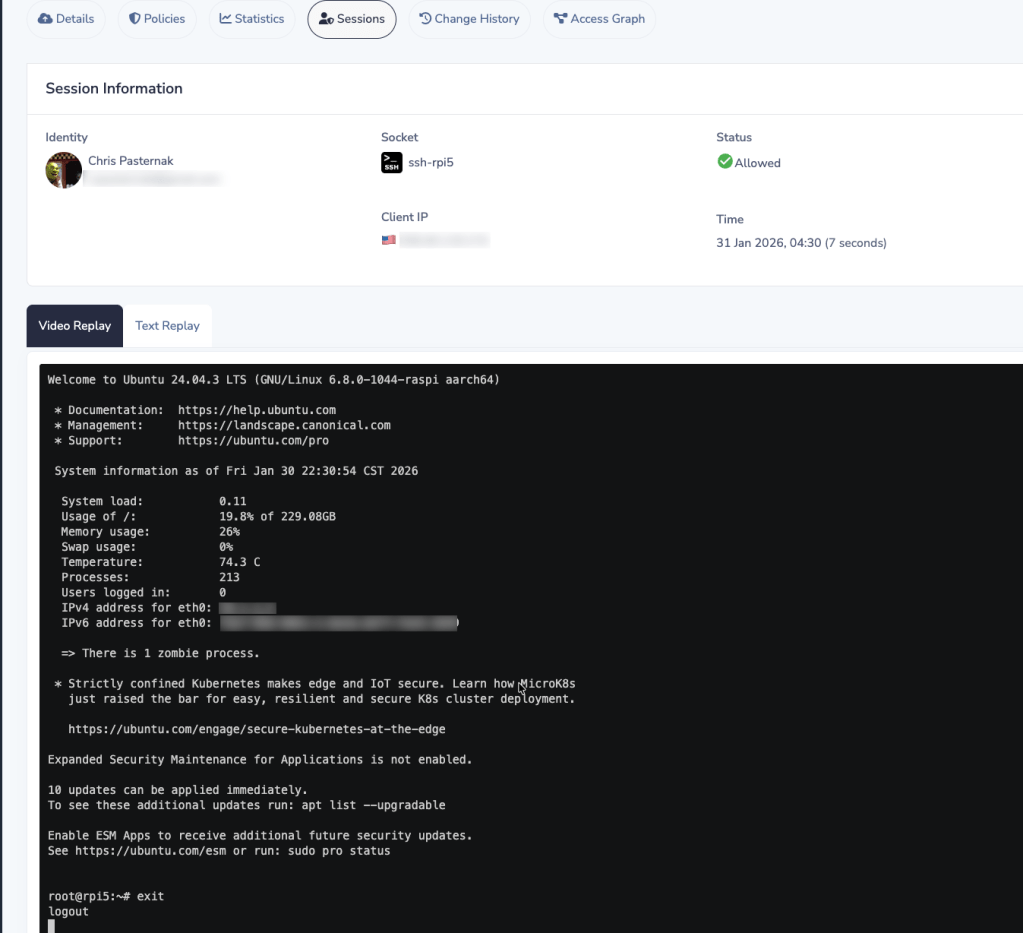
Another big benefit here is that you can set a variety of policies about what connectors and sockets can and cannot do. In the image above, you can see that for my SSH connections, I have chosen to capture the activity of the session. If I think I see a connection that was made and I don’t recognize it, I can replay the session and double check what happened. Border0 offers a free tier as well that allows me to deploy a limited set of these connectors and sockets.
KASM Workspaces
Another tool I found that has been a game changer is called KASM. KASM provides a new way to VNC. It uses SSL/TLS encrypted connections to a remote workspace. By running their install script, it deploys a series of Docker containers that runs a web app that allows me to deploy a variety of tools and desktops.

You can see from the running containers that it deploys a variety of images that manage and direct traffic, as well as serve up the web app that fronts the access. There are a few things I’ve come to like about KASM. The first is that I have a lot of flexibility in what I decide I want to run in my own environment. Everything is based on Docker images and I have the ability to review all of the Docker files to understand what exactly is running.
The second thing that is really great about KASM is that it comes with a marketplace (called a registry) that has a variety of pre-built images. Everything from Ubuntu Desktop to Rocky, RHEL, and Oracle Linux machines. Heck, there’s even an image out there that you could deploy to a GPU enabled machine with CUDA development tools for machine learning and model development.
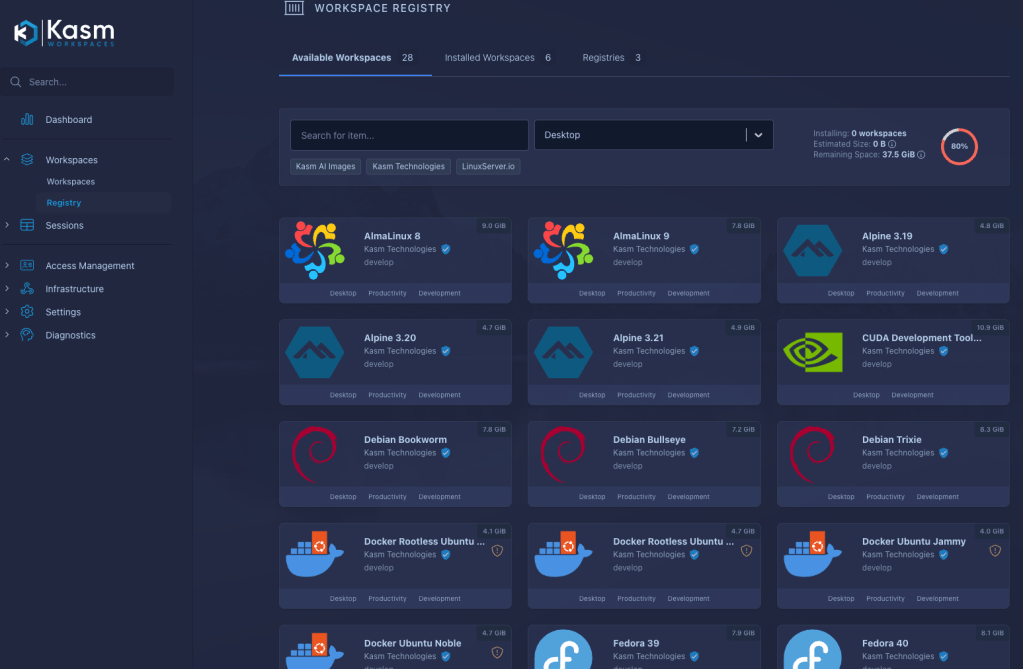
Beyond server and desktop environments, they’ve also developed a method for having individual apps launch. So in the registry, you’ll find apps like Chrome browser, VNC, Gimp, Slack, Signal, Thunderbird, Zoom, and even a copy of Doom (because why not). If you dig into the documentation and look through some of the images, what you’ll find is a pattern that can be used to develop your own images tailored to you specific needs. For example, I have a version of Ubuntu Desktop that I have custom installed a variety of tools and packages. In fact, on the server where KASM is running, I have a cron job that runs every night to re-build the image from scratch so everything gets updated to the latest version. Then when I launch a new session, I’m running with all updated packages and libraries.
The open source, self-hosted version is free to use for personal activities in a single server configuration and OCI even has a marketplace image for you to use to get started. I chose to install myself because it’s so dang easy to do. Once you peal back the layers on KASM, you’ll also find a variety of mechanism to make it your own, such as custom security and access models, integration with LDAP & SAML/SSO, custom volume mapping, and even custom scripts that get run when a server starts up or shuts down.
Jump Cloud
The last tool to talk about is Jump Cloud. Jump Cloud is essentially an Identity Provider (IdP) solution. Like the other solutions here, they have a free tier that gives you some limitations on quantity, but it’s still feature packed. What I really like about it is that I can control and manage both users and devices.
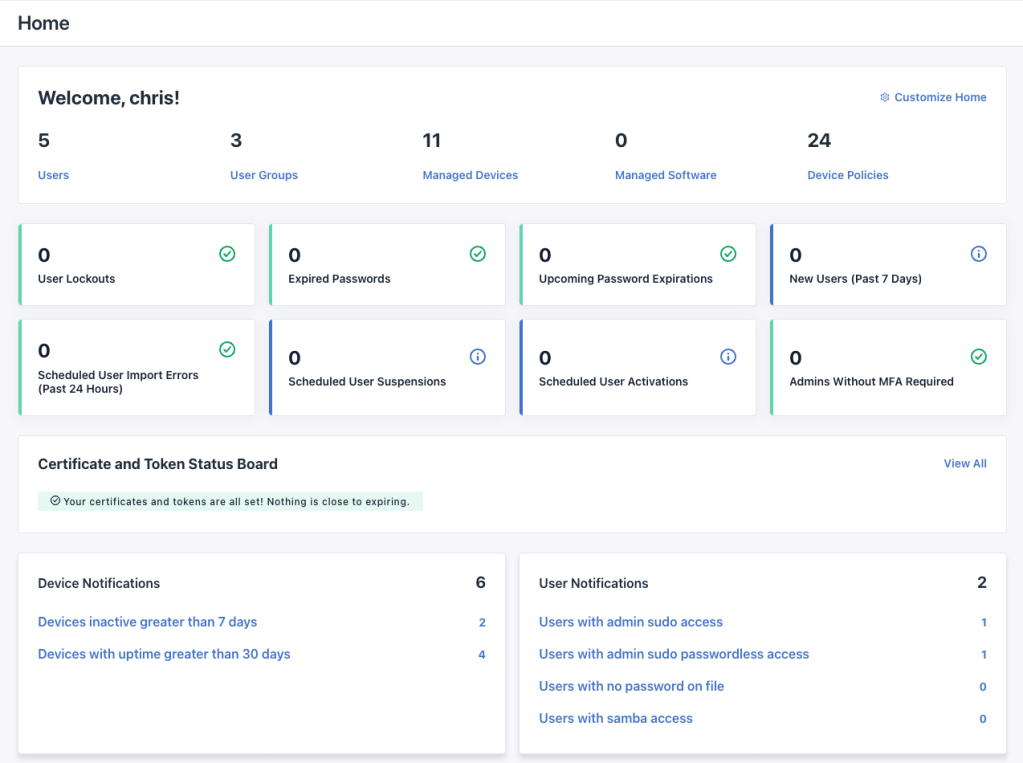
So the first key component is user management. Like you’d expect from an IdP, I can define individuals and develop groups for assignment. From there, I can tie privileges and enforce authentication standards. While that’s all well and good, the next part is where it gets interesting.
I can also manage devices. To do so, I follow a workflow to define a new device, and then I run a command on the server to connect it to Jump Cloud. From there I can start to enforce server level policies and I can start to dish out access based on user and groups. This solution is a lightweight IdP that mixes a little Okta with a dash of Service Now. I can see the health of all of my devices and I can see, at a glance, who has access to do what.
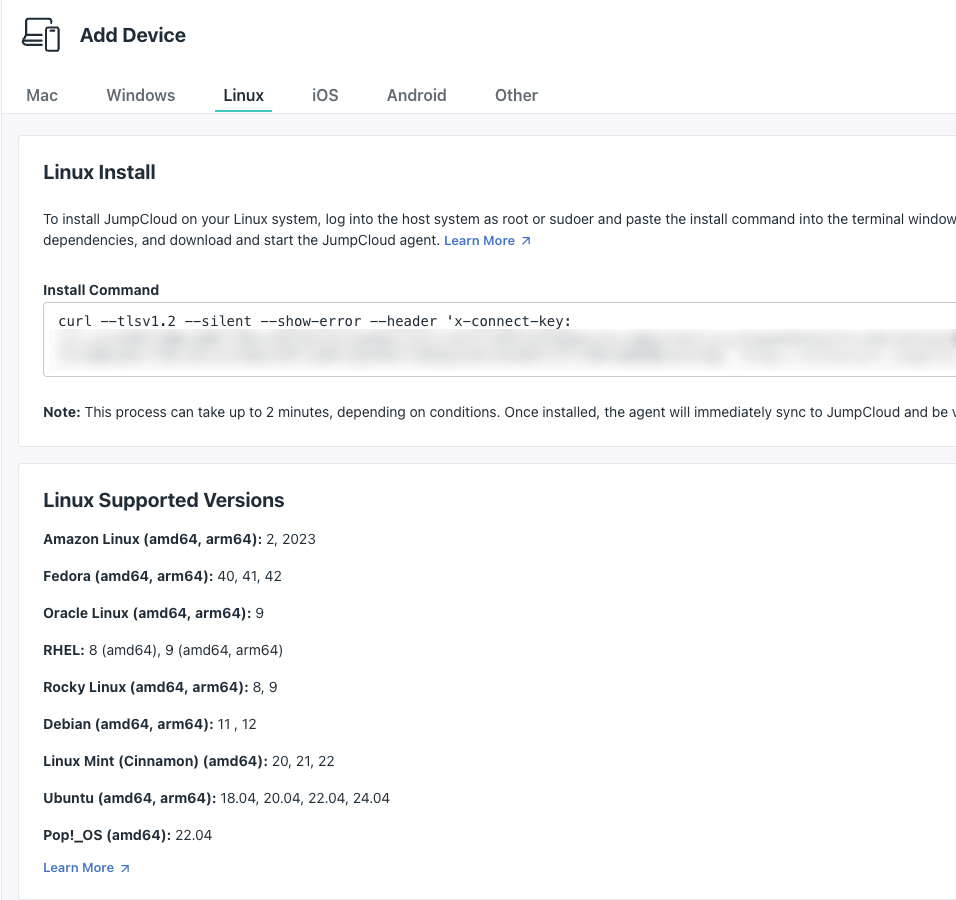
The beauty of Jump Cloud is that I can choose to use a solution like MDM for device enrollment (that’s right, even mobile devices and Macs) or I can rely on an agent running on the server. In fact, when I deploy that agent to a linux server, Jump Cloud integrates with PAM and my account is automatically setup with the appropriate rights. No messing around with LDAP integration.
But what if you want LDAP? Sure. You can do that too. Heck, you can setup a custom app in Jump Cloud and configure SSO. Jump Cloud even has pre-built app connectors to common cloud solutions like Atlassian, Slack, and even our favorite Oracle Cloud. I configured KASM to use LDAP from Jump Cloud and the server KASM runs on is configured with the Jump Cloud agent. And all of this is free because I have a limited number of users.
I recently setup my son and his new MacBook Air on Jump Cloud and I discovered a new feature called Remote Assistant. Now when I’m on the road and he calls me with an issue, I log in to Jump Cloud and use Remote Assistant to view his screen or even take control (he has to grant permission of course).
Summary
The moral of the story here is, there are a lot of tools out there that can cost you zero dollars (or very little) and provide you with great options. These are some of my favorite solutions for personal uses. Again, I think this picture is very different if we’re talking about a large enterprise, regulated industry, or highly confidential/secure environments. Those are clearly situations that take some deep thought and precise planning. But for managing my own environment, I think you could do worse.
 The OCI Tool