

I recently began investigating how I could integrate simple AI solutions with a website I play around with from time to time. I found that OCI’s Generative AI service made it very easy for me since I am using Django as my website framework. Here’s a simple tutorial of how I made it all work. The code I based this one is now posted here for you to review and use.
Getting Started
First, you need to have a tenancy that has access to one of the regions where the Generative AI service is available. You can find the list of regions here. I chose Chicago because my personal tenancy is already subscribed to Chicago.
Checking out the Playground
After you confirm you have one of these regions available, you can navigate to the Generative AI service by going to the OCI main menu and navigating to Analytics and AI > Generative AI (under the AI Services heading). If you don’t see this in the Analytics and AI menu, then you are probably in the wrong region.
Once on this page, you will then see a “Playground” link. If you click on that, you’re brought to the Chat Playground. Here you can choose the model you wish to use. I decided to go with llama3 based on my own personal preferences, but Cohere Command R provides a nice option as well.
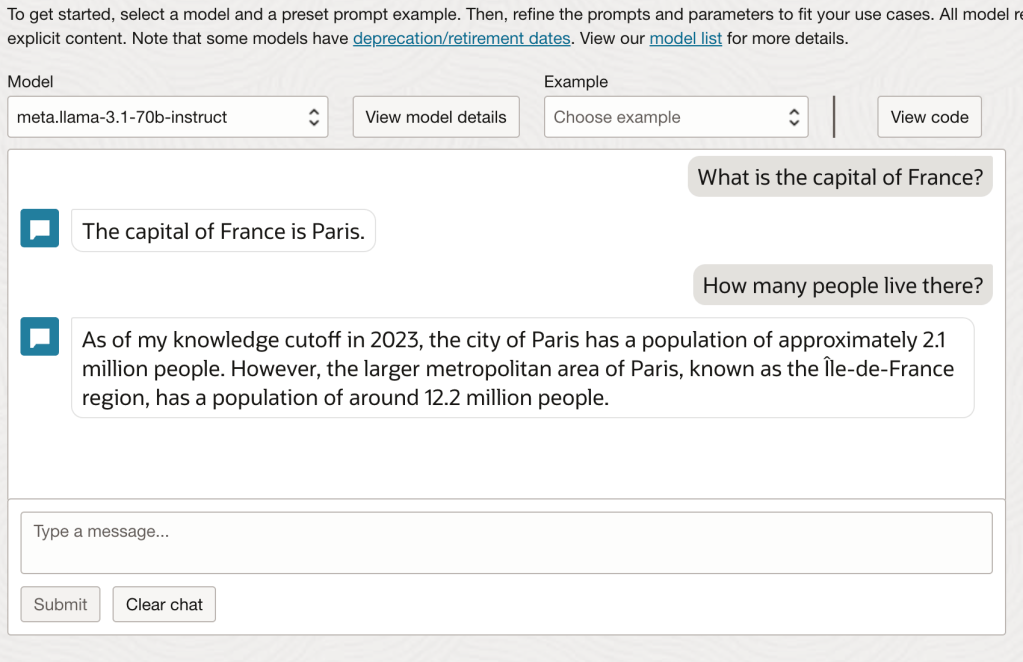
As you can see, I am working with the llama3.1 70B instruct model.
Here I played around a bit with the chat feature to get a feel for it. You should too. Keep in mind, these are the standard LLMs. They have not been trained on any of your specialized data. All they can really help with is what they’ve “learned” from Meta’s training using publicly available data on the internet.
Start Coding
One of the nice features Oracle added to this page is the “View code” button on the top right of the page. If you click on that, you get a few options for code. There’s even an option for integrating with the likes of LangChain. I chose to leverage the Python code.
This is a great starter, but what you’ll find is that it doesn’t provide a chat experience. Every time you run this code, it provides an answer without any context for what you previously asked. That’s where we need to get creative and start modifying.
Create the Chat Experience
Now is the time to take a look at the custom code I created. What you will notice is that the first half of the code looks very similar to that which Oracle provides (thank you product management team!) The second half of the code is where I got creative.
First, I created a loop that will go forever or until you use ctrl+c for the keyboard interrupt. Of course you could work your own magic here, but that was good enough for me.
In this loop, the code asks for a prompt from the user. It then adds that prompt to a list of prompts (which on the first run is empty). It then sends the prompt to the GenAI service. When a response is returned, it saves that response to the same list and then shows the user the result. Here the loop starts over.
The special sauce is that every time a prompt is sent to the GenAI service, it not only sends that prompt, but also sends all previous history in the order it was received (with the latest prompt at the end). This is what gives the service its context for answering the question and allows the user to have a dialogue with the LLM.
Note: The code provided does NOT work with Cohere. That is a different API call.
End Result
If you run the code provided (assuming your config file is located at ~/.oci/config and you’re using the Chicago region), you should be able recreate the example below. Here you can see a simple dialogue that is using the previous context to keep a conversation alive.
========================================================================
You: What is the capital of France?
------------------------------------------------------------------------
The capital of France is Paris.
========================================================================
You: How many people live there?
------------------------------------------------------------------------
As of my knowledge cutoff in 2023, the population of Paris is approximately 2.1 million people within the city limits. However, the larger metropolitan area of Paris, known as Île-de-France, has a population of around 12.2 million people, making it one of the largest metropolitan areas in Europe.
========================================================================
You:
If you did not send the historical context, the second prompt, “How many people live there?” would result in something like this:
This conversation has just begun. I don't have any information about a specific location. Can you please provide more context or information about the place you are referring to?Summary
Oracle makes it incredibly easy to get started using Generative AI. It’s up to you how you will use it to further your business and creative needs. This code is really only the start of what you can do. Consider how you might begin to add features like preambles that ask the model to return references to the information it provided, or provide it with some unique information that it can use to help it devise even better answers to fit your needs.
 The OCI Tool